Screen recording with a webcam bubble
Put your face on the recording. Shotcrisp adds a draggable webcam bubble to any screen, window, or area capture — so demos, tutorials, and bug reports feel personal.
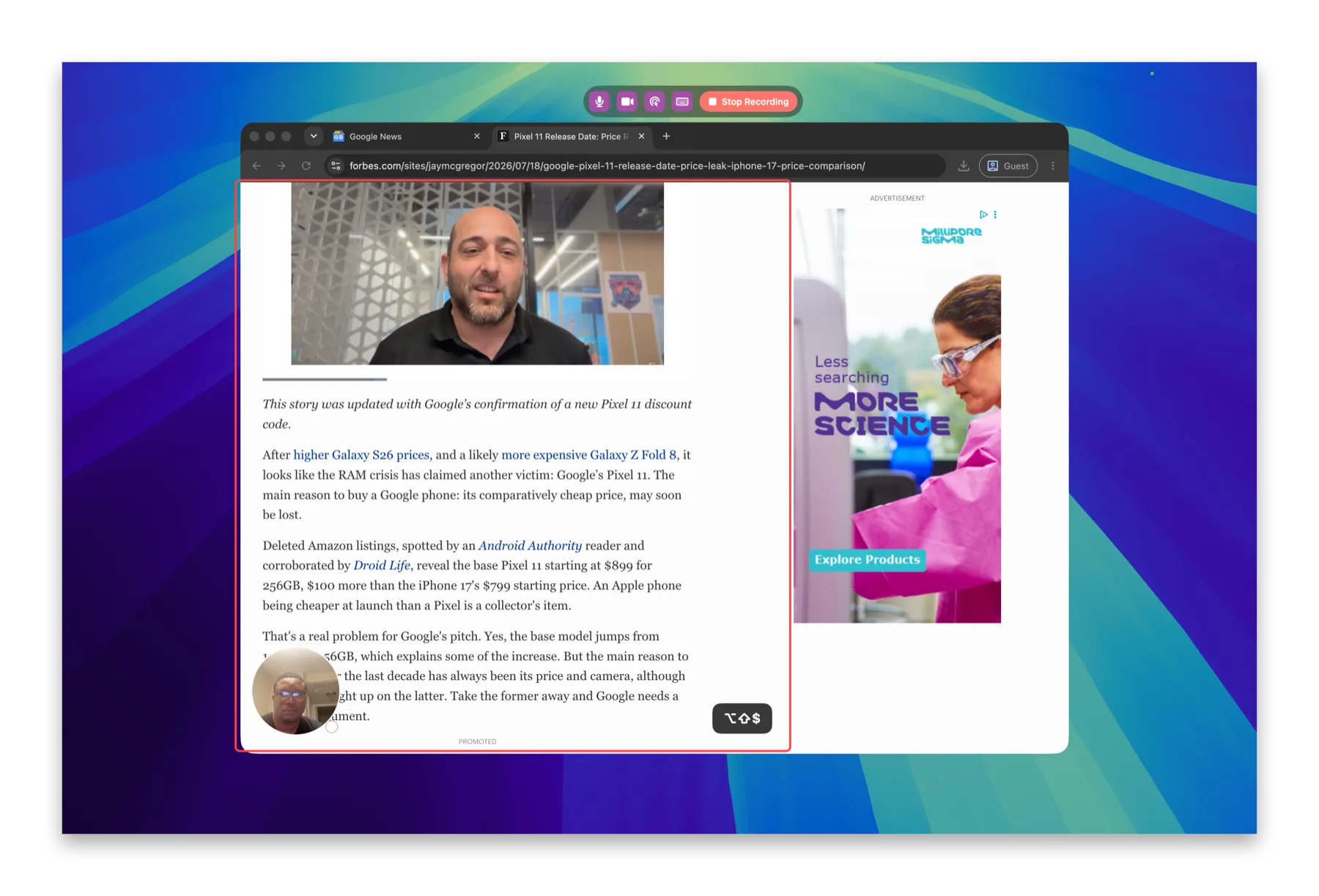
A camera bubble that follows you
Drag it anywhere, resize it, or toggle it mid-take. The webcam bubble is composited straight into the video — so it's there even when you record a single window, which most tools can't do.
Mic, clicks, and keystrokes
Add narration from your microphone, ripple every mouse click, and show keystrokes on screen so viewers can follow exactly what you did. Toggle each on before you hit record.
Trim, then ship
Recordings open straight in the trim editor — cut the dead ends and export as video or an optimized GIF for a pull request, doc, or chat.
Frequently asked questions
Can I move the webcam bubble while recording?
Yes — drag it, resize it, or toggle it off and back on mid-take. Whatever you do is composited straight into the video.
Does the bubble work when I record a single window?
Yes. Because Shotcrisp renders the bubble into the recording itself, it's there even in window and area recordings — where most tools lose the camera.
Can I narrate with my microphone?
Yes — the mic is on a toggle you can flip before and during the take.